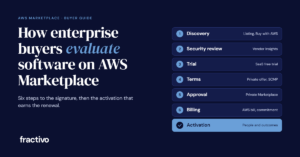
Enterprise buyers evaluate software on AWS Marketplace in six steps: they find the listing, check security, test the product, agree on terms, get internal approval and set up billing. Also, each step uses a specific AWS feature. If you sell to enterprises on AWS, it helps to know which feature the buyer is using at each step, because a gap there slows the deal.
This guide follows those six steps from the buyer’s side. After that, we cover what happens once the contract is signed: activation, customer outcomes and the people who make the motion work. Finally, we finish with what software leaders can do at each step.
Step 1: How enterprise buyers find software to evaluate
The product listing is the buyer’s first filter. For example, it shows pricing, the seller’s terms and, for SaaS, how long a free trial lasts and what it includes. As a result, a thin listing makes your product look less ready than competitors that have a fuller one.
In some cases, the buyer never opens the AWS console at all. With Buy with AWS, AWS says customers can “explore products ‘available in AWS Marketplace’ on Partner websites, request demos, access free trials, and ask for custom pricing.” First, the buyer clicks a button on your site, logs in with their AWS account and reviews the offer on a co-branded page. AWS then processes and manages the transaction in AWS Marketplace. Buy with AWS supports SaaS subscriptions, SaaS contracts, SaaS contracts with consumption and SaaS free trials.
Step 2: Enterprise buyers evaluate software security in Vendor Insights
Security review often takes the longest when enterprise buyers evaluate software. For this reason, AWS built AWS Marketplace Vendor Insights to make it shorter. AWS says it “simplifies software risk assessments by helping you to procure software that you trust and that meets your industry standards.”
When a seller has a Vendor Insights profile, the buyer gets:
- A dashboard covering 10 control categories, including data privacy, application security and access control.
- Live evidence for 25 controls, drawn from the seller’s production AWS accounts through AWS Config.
- Data taken from the seller’s ISO 27001 and SOC 2 Type II reports, along with self-assessments such as the CAIQ.
- Compliance reports on demand through AWS Artifact.
First, the buyer requests access on the listing and signs an NDA with the seller. AWS’s launch post notes that “the process can take a few days.” According to AWS’s pricing page, Vendor Insights is free for buyers, and access for evaluation before purchase lasts 60 days by default. Meanwhile, sellers pay only for the AWS Config and Audit Manager usage behind the automated evidence.
Step 3: Enterprise buyers evaluate the software in a trial
Most enterprise buyers evaluate software hands-on before they commit. AWS’s features page puts it plainly: buyers use free trials to “get hands-on experience before purchasing, build proofs of concept, and experiment with different products.”
In addition, three rules from AWS’s SaaS free trial guide affect how you plan a proof of concept:
- Each AWS account gets one free trial per product.
- The listing sets the trial length and how much usage is included.
- “SaaS free trials won’t automatically convert into paid agreements.” To keep using the product, the buyer subscribes to a public offer or negotiates a private offer.
Because the trial doesn’t convert on its own, your team needs to be in touch with the buyer before it ends.
Step 4: Terms get agreed through private offers and the SCMP
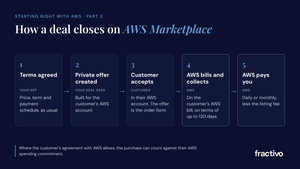
Of course, enterprise deals rarely close at list price. A private offer lets the seller give a specific buyer “product pricing and EULA terms” that aren’t public. Then the buyer accepts in AWS Marketplace, which creates the agreement with the seller. In addition, a single offer can cover up to 25 AWS accounts. However, private offers expire, so the seller has to extend or reissue one that lapses. AWS also notes that buyers “can access third-party financing services for private offers.”
Legal review is the other slow part, and the Standard Contract for AWS Marketplace (SCMP) addresses it. AWS describes the benefit this way: “Instead of reviewing custom EULAs for each purchase, you only need to review the SCMP once.” For example, sellers can use the SCMP as their default EULA or as the starting point for negotiation. Similarly, they can add standard addendums for enhanced security, HIPAA or federal requirements. If the buyer needs custom terms, a private offer can carry them.
Note that AWS is not a party to these contracts. The agreement is between the buyer and the seller.
Step 5: Procurement controls decide who can buy
In many enterprises, an engineer who likes your product can’t subscribe to it straight away. Specifically, two AWS features govern that.
Private Marketplace. AWS says Private Marketplace lets administrators “create and customize curated digital catalogs of approved independent software vendors (ISVs) and products that conform to their in-house policies.” In other words, users can browse any listing, but they can only subscribe to approved products. Everything else shows a banner saying the product is “not approved for procurement in AWS Marketplace.” If the administrator has turned on software requests, users can click Create request to ask for a product to be added.
Procurement system integration. Buyers using Coupa or SAP Ariba can search AWS Marketplace from inside those tools through a punchout. Instead, their purchase goes back to the procurement system as a requisition, runs through the usual approval workflow, and completes on AWS Marketplace once approved. For usage-based SaaS, the buyer may need an extra requisition if actual usage goes above the estimate on the purchase order.
Step 6: Finance checks the bill and the commitment
For the CFO’s office, a big reason to buy through AWS Marketplace is that the purchase shows up on the AWS bill. AWS says buyers can “centrally manage all of your AWS purchases from one dashboard” (AWS). As a result, the buyer has one less vendor to set up in the payment system.
Even more important is the AWS commitment. AWS’s private pricing overview says that “qualifying AWS Marketplace purchases all count toward your commitment.” Therefore, a buyer with an AWS commitment to meet may prefer a product they can buy this way. The key word is “qualifying.” Buyers should confirm with their AWS account team that a specific purchase qualifies before assuming it counts.
After the signature: activation, outcomes and the people behind them
An accepted private offer starts the customer relationship. For SaaS, the buyer still has to set up an account on the seller’s side after subscribing, as AWS’s Buy with AWS flow shows. After all, a subscription nobody activates brings in no usage, delivers no outcome and gives you no case for renewal.
Activation works best when it’s planned before the offer is signed:
- Agree on two or three business outcomes with the buyer’s sponsor, and how you will measure them.
- Name the first milestone where the customer sees value, and put a date on it.
- Have an onboarding owner on your side who meets the customer’s team in week one.
- Review usage against the outcomes at 30, 60 and 90 days, and share the results with the sponsor and the AWS account team.
Marketplace success runs on people
Agents and automated systems now do a lot of the work. They build listings, generate private offers, route approvals and match invoices. As a result, the paperwork moves faster. Even so, deals still move because the right people trust each other and act at the right time.
| Person | What they do in the motion | What helps them |
|---|---|---|
| Buyer’s champion | Carries the product through security, legal and procurement | A clear business case and fast answers |
| Procurement and legal | Approve the vendor, terms and spend | Vendor Insights, the SCMP and a clean private offer |
| AWS account manager | Knows the customer’s priorities and AWS commitment | A short note on the customer outcome your product drives |
| Your seller and alliance lead | Run the deal and coordinate with AWS | Shared account plans and regular contact with AWS sellers |
| Your customer success lead | Turns the subscription into outcomes | An activation plan agreed before signature |
| Channel partner, if involved | Resells through a Channel Partner Private Offer | Agreed margins and a clear owner for the account |
The software companies that do best on AWS Marketplace treat the listing as plumbing and put their effort into these relationships.
Our take: help enterprise buyers evaluate your software
Each step in how enterprise buyers evaluate software is somewhere a deal can stall. Here is how we would work on each one.
| Buyer step | Where deals stall | What to do |
|---|---|---|
| Discovery | The listing looks thin next to competitors | Write the listing for a buyer, and add Buy with AWS buttons to your pricing page |
| Security review | Questionnaires take weeks | Publish a Vendor Insights profile, so the buyer’s security team starts with evidence |
| Trial | The trial runs out with no next step | Agree on success criteria up front, and have the private offer ready before the trial ends |
| Terms | Legal review starts from scratch | Use the SCMP as your default EULA, and send custom terms through the private offer |
| Procurement | The product is missing from the buyer’s approved catalog | Ask the champion about Private Marketplace and the procurement system early |
| Finance | The buyer doesn’t connect the purchase to its AWS commitment | Raise the commitment with the buyer and the AWS account team, and let them confirm it qualifies |
| Activation | The subscription is signed but nobody uses it | Treat the first value milestone as part of the deal |
Your Marketplace motion is only as strong as the team behind it. In short, the tools cover the transaction. Your people earn the trust, keep the AWS account team in the loop, and turn the subscription into a result the customer will renew.
FAQ
How do enterprise buyers evaluate software on AWS Marketplace?
Most enterprise buyers evaluate software in six steps: discovery on the listing or a seller’s site, security review, a trial, terms through a private offer, internal approval, and billing on the AWS bill. Each step uses an AWS feature such as Vendor Insights, SaaS free trials, private offers, the SCMP or Private Marketplace.
Is AWS Marketplace Vendor Insights free for buyers?
Yes. AWS says there is no charge for buyers. However, access for evaluation before purchase lasts 60 days by default.
Do SaaS free trials on AWS Marketplace convert to paid automatically?
No. AWS says SaaS free trials won’t automatically convert into paid agreements. The buyer has to subscribe to a public offer or accept a private offer.
Do AWS Marketplace purchases count toward an AWS commitment?
AWS says qualifying AWS Marketplace purchases count toward your commitment. Buyers should confirm with their AWS account team that a specific purchase qualifies.
Work with Fractivo
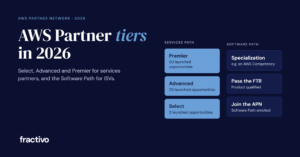
Fractivo helps software companies set up and run their AWS Marketplace motion, from the listing and private offers to working with AWS sellers and getting customers activated. If deals are stalling at any of these steps, talk to us. For background, read our guides to selling on AWS Marketplace, AWS Partner tiers and preparing to co-sell with AWS.
Sources
- Using Buy with AWS as a buyer, AWS Marketplace Buyer Guide
- AWS Marketplace Vendor Insights, AWS Marketplace Buyer Guide
- AWS Marketplace Vendor Insights launch post, AWS News Blog
- Vendor Insights pricing, AWS
- Subscribing to SaaS free trials, AWS Marketplace Buyer Guide
- Private offers in AWS Marketplace, AWS Marketplace Buyer Guide
- Contracts for products sold in AWS Marketplace, AWS Marketplace Buyer Guide
- Private Marketplace, AWS Marketplace Buyer Guide
- Integrating AWS Marketplace with procurement systems, AWS Marketplace Buyer Guide
- AWS Marketplace features, AWS
- AWS private pricing overview 2026, AWS